It’s done. Version 1.0 was released today. The feature that was missing from 1.0 was “add to queue,” which allows you to create a current queue or playlist. I’ve now added that. I’m excited to introduce the latest version to you in this short post.
New in 1.0
- ⏭ A play queue — line tracks up while something is playing instead of
replacing what is already there.
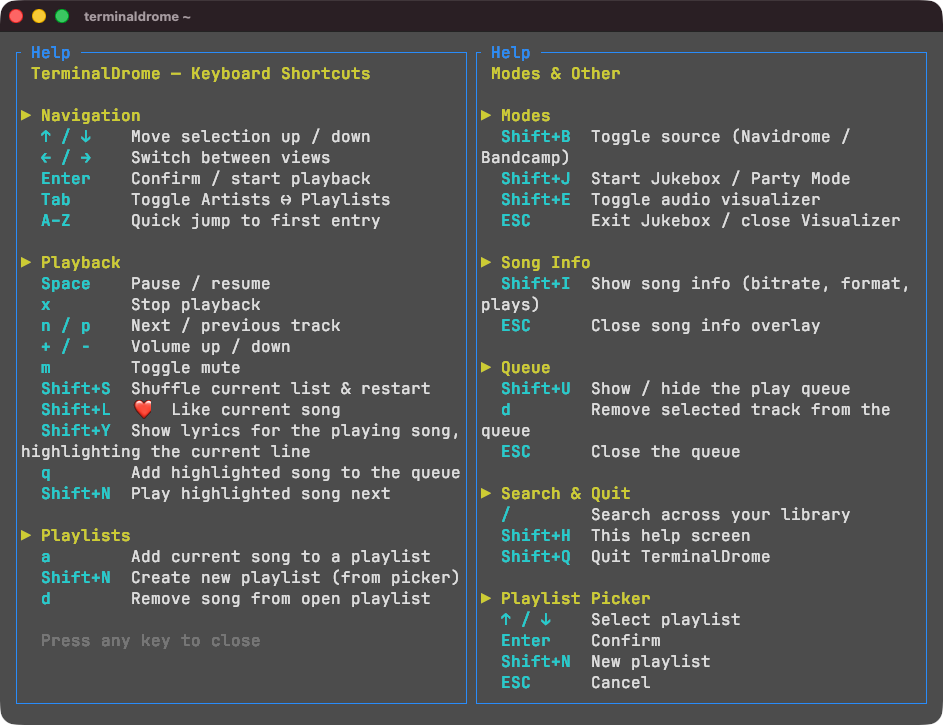
qadds the highlighted song to the end of the queue,Shift+Nputs it straight after the track that is playing, andShift+Uopens the queue to see what is lined up and drop tracks from it withd. Queueing with nothing playing simply starts that track. - 🧭 Browsing and playing are two lists now — they used to be one, so searching or stepping back to browse an album while a song played could throw the now-playing line onto the wrong track. The queue is its own list, kept in step with mpv, and the now-playing line stays correct wherever you wander.
- 📌 The now-playing line survives browsing — going back to the artist or album list while a track plays no longer blanks it out.
The queue was the last item on the roadmap; with it, TerminalDrome is feature-complete.
Version 1.0.0 The Play Queue
The play queue. Tracks can be lined up while something is playing — q appends
one, Shift+N puts one directly after the current track — and Shift+U shows
the queue, where d drops a track from it. Queueing with nothing playing starts
that track instead, since there is no queue to append to yet. This was the last
item on the roadmap; with it, TerminalDrome is feature-complete.
The queue is also a separation that was not there before. The list on screen and the list mpv was playing used to be one and the same, so anything that replaced one of them — a search, or stepping back to browse an album — silently moved the now-playing line onto a different track. They are two lists now, and the now-playing pointer indexes the queue, so browsing and searching leave it alone.
Added
- The play queue:
qadds the highlighted song to the end,Shift+Nplays it next, andShift+Uopens the queue, wheredremoves the selected track. - A
⏭ Ncounter in the status bar while the queue is not empty.
Changed
- The browse list and the play queue are separate lists. Starting playback snapshots what is on screen into the queue; queueing adds to the queue without disturbing what is on screen.
- The now-playing line, scrobbling, likes, lyrics and song info read from the queue rather than from the browse list.
- Stepping back to the artist or album list while a track is playing keeps the now-playing line instead of blanking it.
- Removing a track from a playlist no longer shifts the now-playing pointer: the server-side playlist and mpv’s queue are separate lists now.
Fixed
- The now-playing line no longer drifts onto the wrong track when a search replaces the song list during playback.